Social media templates for real estate agents promise one thing: an end to the blank page. The reality depends on which kind you buy. Some hand you a finished post. Some hand you a design file and an evening of editing. This guide separates the kinds, names what each one still makes you do, and gives you a seven point checklist to run before you pay.
Answer, up front: judge every template pack by the work left over after you buy it. If the caption, the hashtags and the local details still have to be written by you, you have bought a starting point, not a finished post. The best template is the one whose remaining job is swapping in your city, your price and your name.
Most agents do not have a talent problem. They have a Tuesday evening problem: a listing to announce, a feed quiet for a week, and a caption box that will not fill itself. Templates exist because that evening repeats. The question is how much of the job a given pack actually finishes.
The four kinds of templates you will find
Almost everything sold under this label is one of four things. They look similar in a shop listing and behave very differently on a Tuesday evening.
- •Editable design files. A Canva style file you open, retype, restyle and export yourself. You get the layout. The writing, the photo choices and the export are still yours, every time.
- •Caption template lists. A document of fill in the blank captions: hooks and formulas with gaps for the address, price and features. No design is included, but the words come faster.
- •Finished post packs. The graphic is done, the caption is written, the hashtags are chosen and a short prompt tells you when to post. Your job shrinks to swapping in the marked local fields.
- •Generators. Software that writes the post from your listing details instead of selling you a fixed set. No two listings share the same words, because the words start from your numbers.
None of these is automatically the right buy. Buy for the work you will actually skip, not the work the sales page photographs well.
What each kind still makes you do
Run this test on any pack, including ours: list the steps between buying it and pressing post. For editable files the list is long. Open the file, replace the photo, rewrite the headline, fix the text that no longer fits, write the caption from scratch, find hashtags, export, then post. The template saved the layout and nothing else.
Caption lists cut that list in half: the words have a formula, but you still supply the design. Finished packs cut it to three steps: swap the marked fields, paste the caption, post. A generator cuts it differently: enter the listing once and get captions written for that home.
Skip the blank caption box
The free Listing Post Generator writes this exact kind of post from your listing details: your city, your numbers, your name, in about 20 seconds. Caption 1 is instant; all three captions plus hashtag sets unlock with an email.
Try the free generator →Time is only half the test. The other half is sameness. A fixed template used across your city produces near identical feeds, and followers notice. Local fields are the antidote: a caption built from your street, your price and your listing reads as yours even when the layout is shared.
The seven point checklist before you buy
Before paying for any set of real estate social media templates, check these seven things in the samples. A seller who cannot answer one is asking you to buy on trust.
- 1.Are the captions written, or only the graphics? A beautiful graphic with no caption leaves the hardest part with you. Look for the caption, hashtag set and posting prompt attached to each post.
- 2.Are the fields you must swap clearly marked? Good packs mark every city, price, address and name field in one style, and include a worksheet listing them all, so nothing ships with a placeholder in it.
- 3.Can you see every post before you pay? The full contents, shown as they will arrive, not a collage of the three best. Mockups instead of real files means the rest is unseen.
- 4.Does the language describe property, not people? Templates carry the seller's wording into your advertising. Phrases describing who a home suits, instead of what it offers, are a fair housing risk. Our fair housing guide lists what to avoid and the property first wording to use instead.
- 5.Do the sizes match how you post? Feed posts, carousels and vertical Reel covers are different shapes. Check the pack covers the formats you publish, or you will resize files by hand.
- 6.Is the licence stated in plain words? You need commercial use for your own marketing, in writing, including whether a team member may post from the same files.
- 7.Is there a way back if it does not fit? A guarantee period, stated before purchase, says the seller expects the pack to survive your real listings. No guarantee is also an answer.
What good looks like: one post, taken apart
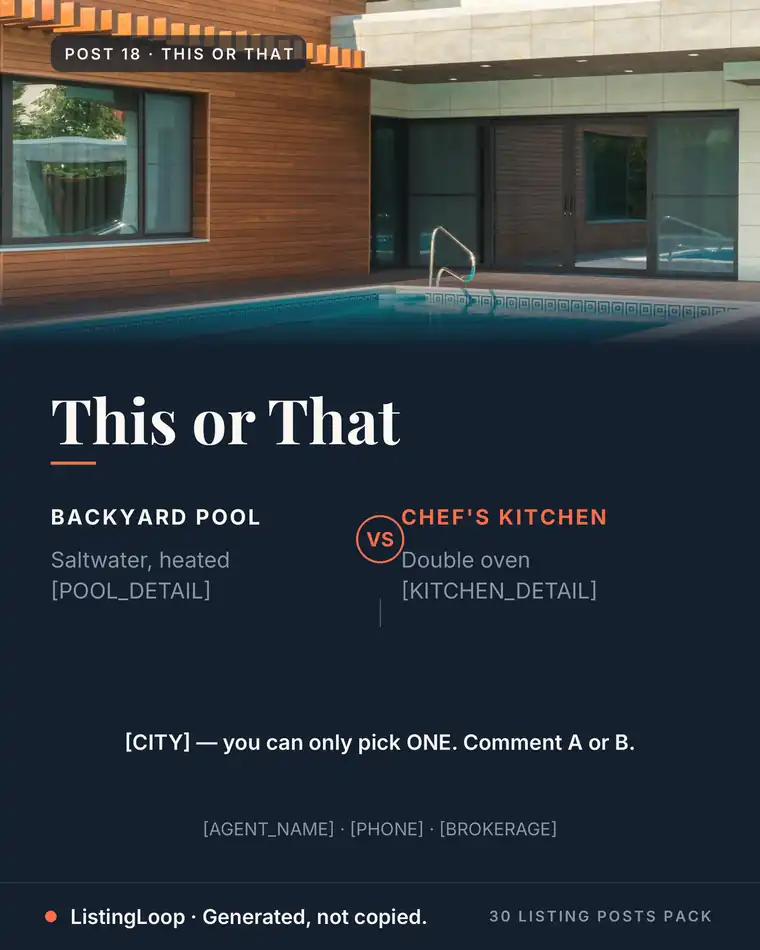
Take the This or That poll post from our own pack, shown in full on the templates page. The photo and layout are finished. The comparison is written: a backyard pool on one side, a kitchen with a double oven on the other. The fields left for the agent are marked in brackets: the city in the question line, then the name, phone and brokerage in the footer. The caption and posting prompt travel with the graphic.
Hold every pack to that standard, whoever sells it: open a sample and count the decisions left for you. Three or four marked fields is a finished post. A blank text box, an empty caption area and a photo to source yourself is a project. Both are sold under the same word, template.
When a template is the wrong tool
Templates cover the repeating posts: education, local, engagement and standard listing announcements. They strain when the post must be built from one specific home: the unusual feature, the price story, the detail no fixed file could know. That is generator work. The free Listing Post Generator writes three captions and five hashtag sets from your listing details in about 20 seconds, in the hook, specifics and one call to action formula our just listed captions guide teaches.
Templates also do not decide your rhythm. Pair any set with a weekly rotation, like the one in our realtor content calendar, and the ideas bank in our post ideas guide, so finished posts land across the week instead of in one burst. For the one event that runs on its own clock, an open house, our open house post ideas give the before, during and after order to drop those finished posts into.
Frequently asked questions
What is the difference between a template and a finished post?
A template is a starting file you still edit: change the photo, retype the text, export it yourself. A finished post arrives complete, graphic done, caption, hashtags and posting prompt written. Your only job is swapping in the marked local fields.
Do I need Canva to use real estate social media templates?
Only for the editable kind. Design file templates assume a Canva style tool and the time to use it. Finished post packs and generators do not: the files arrive ready to post, and the generator works in a browser from your listing details.
How many templates does an agent actually need?
About a month of posts at your real cadence. At three to five posts a week, that is roughly 15 to 25 posts covering listings, education, local and engagement. More files than you will post is inventory, not value.
Will my posts look like every other agent's?
The layout may be shared. The words should not be. A caption built from your listing, your city and your numbers reads as yours, because followers read captions, not layouts. If a pack ships identical captions with no local fields, skip it.
What should I check first in a free sample?
Whether the sample is a real delivery file or a polished mockup, and how many decisions it leaves you. Count the marked fields, read the caption in full, and check the wording describes the property rather than the buyer.
Buy the pack whose leftover work you are willing to do, and judge it on real files, not mockups. The finished post library this guide uses as its example is shown in full on our templates page and listed on the pricing page.
Want the month done for you?
The 30 Listing Posts Pack: a full month of posts, finished graphic, written caption, hashtag set and posting prompt on every one. $17, one time. No subscription.
Want to use these examples with a real listing?
Create a draft